Technology is amazing, isn’t it?
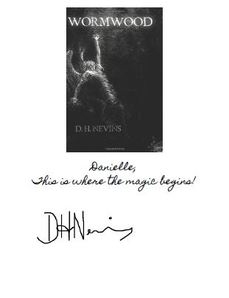
Just when you thought e-books and e-readers were cool, out comes a service that allows authors to sign your digital device. Yes, e-autographs are now possible! The service I’ll be raving about here is called Kindlegraph, but don’t be fooled—you don’t need a Kindle at all to use it. You don’t even need to own an e-reader. Read on...
It’s incredibly easy to request, send or receive a digital autograph, so there’s no reason you shouldn’t try it out. All you will need is:
Just when you thought e-books and e-readers were cool, out comes a service that allows authors to sign your digital device. Yes, e-autographs are now possible! The service I’ll be raving about here is called Kindlegraph, but don’t be fooled—you don’t need a Kindle at all to use it. You don’t even need to own an e-reader. Read on...
It’s incredibly easy to request, send or receive a digital autograph, so there’s no reason you shouldn’t try it out. All you will need is:
1) Some way to get online (android phone, computer, iPad, etc.)
2) An email account or a Kindle
3) A Twitter account
You might have noticed that I didn’t mention needing an e-reader... that's because it isn’t necessary! You don’t even need to have an electronic copy of the book. You can have a digital autograph sent directly to your email, which is perfect for those that only have a print copy of the book, but would love the author’s autograph.
Links to access your personalized Kindlegraph will be sent to you, and the email will include two different formats: a PDF version (viewable in applications like iBooks or on PC, Mac, etc.) and an AZW version (viewable in all Kindle apps on iPad, iPhone, your Kindle or your PC.) How perfect is that?
Links to access your personalized Kindlegraph will be sent to you, and the email will include two different formats: a PDF version (viewable in applications like iBooks or on PC, Mac, etc.) and an AZW version (viewable in all Kindle apps on iPad, iPhone, your Kindle or your PC.) How perfect is that?
Here’s how you do it:
· Authors and readers alike can go to http://www.kindlegraph.com/ and then sign in with Twitter.
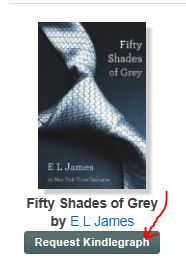
· Readers, simply search for a book or author. Then click the button beneath the image to request your Kindlegraph.
· Authors, search for your own book and click the button to add it (that’s it!)
· Authors and readers alike can go to http://www.kindlegraph.com/ and then sign in with Twitter.
· Readers, simply search for a book or author. Then click the button beneath the image to request your Kindlegraph.
· Authors, search for your own book and click the button to add it (that’s it!)
Readers:
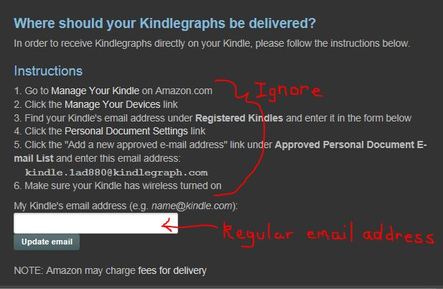
A box will then pop up asking for information from you (they need to know where to send your digital autograph). Unless you want the autograph sent directly to you Kindle*, ignore all the steps and simply enter your regular email address into the text box at the bottom.
* If you do want the digital autograph to be sent to your Kindle, there is a chance Amazon will charge you a small delivery fee. You can bypass this by having the e-autograph sent to your regular email account. Then transfer the file to your Kindle (or other e-reader) manually. This is a good route if you simply must have the autograph stored on your Kindle (or other e-reader), but would rather not have to pay Amazon for it.
A box will then pop up asking for information from you (they need to know where to send your digital autograph). Unless you want the autograph sent directly to you Kindle*, ignore all the steps and simply enter your regular email address into the text box at the bottom.
* If you do want the digital autograph to be sent to your Kindle, there is a chance Amazon will charge you a small delivery fee. You can bypass this by having the e-autograph sent to your regular email account. Then transfer the file to your Kindle (or other e-reader) manually. This is a good route if you simply must have the autograph stored on your Kindle (or other e-reader), but would rather not have to pay Amazon for it.
· Your Kindlegraph request will then be sent to the author (you’ll have the option of including a short message as well)
· The author is then able to write a personalized message to you, which will appear under an image of the book. He or she will then sign it digitally, using either their mouse, iPad screen, or they will type it in a script font.
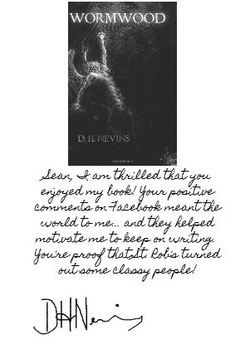
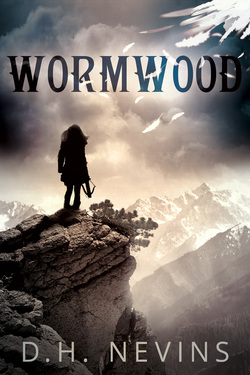
If you would like to try it out, I enthusiastically volunteer to be your guinea pig. Please feel free to send me a Kindlegraph request, and I promise to reply with a digital autograph that’s curt, heartfelt, snarky or dirty... I just can’t promise which it’ll be. Depends on my mood at the time, you know? Here’s the link to request a Kindlegraph for my book, Wormwood: http://www.kindlegraph.com/authors/dhnevins
For more info on Kindlegraphs, here’s their Frequently Asked Questions page: http://www.kindlegraph.com/books/new
Another service to check out is Autography (http://www.autography.com/). It's also fabulous, though it takes a little more time to set up. If you ask me, it's certainly worth checking out! Each service has different authors in their rosters, so why not hop between the two of them?
Thanks to changing technology, personalized autographs from our favourite authors are now accessible to everyone. So why not you? Try it out, and enjoy!
For more info on Kindlegraphs, here’s their Frequently Asked Questions page: http://www.kindlegraph.com/books/new
Another service to check out is Autography (http://www.autography.com/). It's also fabulous, though it takes a little more time to set up. If you ask me, it's certainly worth checking out! Each service has different authors in their rosters, so why not hop between the two of them?
Thanks to changing technology, personalized autographs from our favourite authors are now accessible to everyone. So why not you? Try it out, and enjoy!





 RSS Feed
